

Scan your first report
- Go to More, Health, Health records and tap Scan a report or prescription.
- Pick Lab report and take a clear photo of the whole page in good light.
- Check each value, save, and watch the trend build with every report.
How the scan works
Point your camera at the report. everbud reads each result along with the lab's own printed range, and leaves anything hard to read blank for you to fill in. You check every line, and nothing is saved until you confirm it.
Ready for the appointment
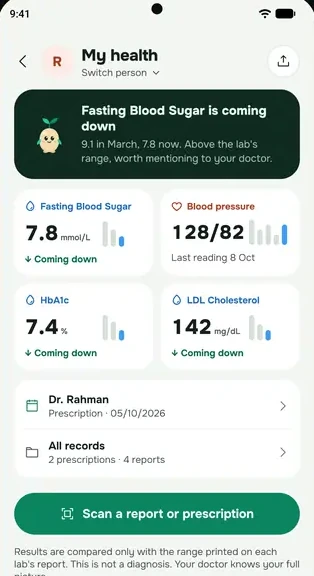
My health shows your latest values, such as fasting blood sugar, HbA1c or cholesterol, next to your earlier readings. With Plus or Family, share one clear summary with your doctor instead of a stack of papers: a PDF, or a private link that works for 7 days. Free shows your last 3 months of results.
Results are compared only with the range printed on each lab's report. This is not a diagnosis, and only your doctor can tell you what a result means for you.
Questions
Is the scan a diagnosis?
No. A scan copies what the report says and compares it with the lab's printed range. It never tells you to start, stop or change a medicine.
How many reports can I scan?
Each scan uses one AI action. Free includes 15 a month. Plus includes 30 document scans a month and Family 50 for the whole family. You can always type results in by hand, free. Free, Plus and Family.
Can I keep my parents' reports too?
Yes, with the Family plan. On the My health screen you can switch person, so a parent without a phone keeps their reports in their own folder, and a family member who shares their reports with you appears there too.
Start everbud for free
Try the Family plan free for 14 days when you set up everbud. No card needed, and afterwards you stay on Free unless you choose a plan.