


Set it up in a minute
- Go to More, Settings, Notifications & reminders and turn on Prayer screen.
- Tap Preview the prayer screen, lock your phone, and wait about 15 seconds.
- Open Keep reminders on time and follow the steps it shows for your phone.
What happens at prayer time
On Android, the prayer screen comes up over your lock screen at each prayer time. It shows the prayer, the time left and three buttons: I'm going to pray, Remind me in 15 min, and I've already prayed. On iPhone, it opens when you tap the reminder or open the app. The reminder comes about 2 minutes after the time begins, so it is never early. If a prayer isn't marked, one gentle reminder comes 20 minutes before its time ends, and you can turn that off.
A gentle sound, on purpose
Many of us already hear the adhan from the mosque, so everbud starts with a gentle sound: your phone's notification sound, with the calm prayer screen. The reminder uses your phone's sound, not a recorded adhan.
Fajr, so you don't sleep through it
Turn on Ring Fajr even on silent or Do Not Disturb, and Fajr rings like an alarm even when your phone is on silent. The other four prayers still follow your phone's sound settings. On iPhone, the same switch lets the Fajr reminder through Focus and Do Not Disturb.
On time, on any phone
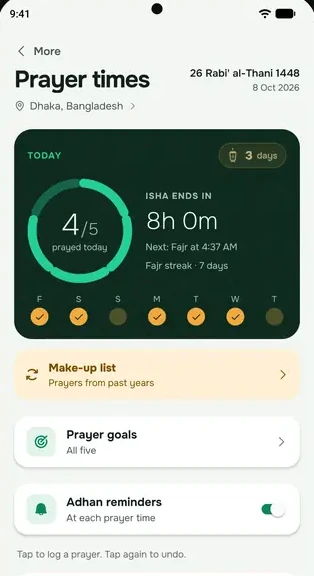
Some phones put apps to sleep to save battery, and then reminders come late. everbud shows a warning on the Namaz screen when your phone may be late, and a Keep reminders on time page with only the steps your phone needs. Our help centre has step-by-step pages for Samsung, Xiaomi, Redmi and Poco and Oppo, Realme and OnePlus.
The reminder follows your phone: it is silent when your phone is on silent or Do Not Disturb, except Fajr if you turn on the Fajr switch. A few minutes' difference from your mosque is normal. For jamaat, follow your mosque.
Questions
Does everbud play the adhan?
Not as a recording for now. At prayer time you get your phone's notification sound with the prayer screen, and Fajr can use your phone's alarm tone if you turn that on.
The reminder came late, or as a small notification. Why?
Your phone may be limiting everbud in the background, or full screen notifications may be off. Reminders late or missing? Start here walks you through it, and Adhan not full screen on the lock screen covers the lock screen.
Can I turn the reminders off?
Yes. In Notifications, turn off Prayer screen to stop the full-screen prayer screen, or turn off Prayer times to stop prayer reminders. On the Namaz screen, the Adhan reminders switch turns the daily reminders on or off.
Is it free?
Yes. Prayer times and prayer reminders are free for everyone, always, with no ads on any faith screen.
Start everbud for free
Try the Family plan free for 14 days when you set up everbud. No card needed, and afterwards you stay on Free unless you choose a plan.